by Sherri Sylvester | Mar 17, 2016

Do buttonholes and zipper installations get you feelin’ like “Where’s my Velcro stash again?” Even if they don’t make you to run in the other direction, chances are with a new machine (or an old one!) there’s something you don’t know.
Welcome to Week 2 of the Sewing Diaries: the Closures Edition. This past week I’ve been learning about how to make buttonholes and install a zipper on the Janome Skyline S7 that’s been loaned to me. I think it’s the second most important thing to learn on a machine – unless you are a quilter, in which case I suppose it is not as vital and you could skip this week. WAIT! What am I saying? I’m a blogger and writing is my paycheck! Rephrase: “Always – Read – Every – Word!” #noskippingallowed
Disclaimer: A Skyline S7 has been loaned to me for the purpose of writing this series. As with all products I write about, I will always tell you my own honest opinion. I purchased and loved Janome machines long before they contacted me. Janome has not asked me to qualify my opinions in any way.
Depending on how complex your sewing machine is, there can be a learning curve to how each manufacturer has set up each process. Once you have made a a few buttonholes and installed a zipper I promise they won’t feel so foreign! I’ve included a round-up of tutorials for both buttonholes and zippers below so you can feel confident. As always, it is best to always check your manual, because machines vary so much.
Sewing Buttonholes
I started sewing my girls’ Easter dresses, which have a total of 43 1/2 yards of tulle between them! (Insane I tell you! *edit: They are finished! See the Easter Dresses here.) Anyhow, they each require two buttonholes and so this was a good opportunity to learn how to do it on the Skyline S7. The above photo has a button sewing foot in it as well – but since the buttons I picked have curved edges it wasn’t a good time to try it. I’ll have to post the process on Instagram in the future.
There are a variety of ways machines are set up to make buttonholes, and some basic models don’t have buttonhole feet as an option. I’ve had experience using a SUV1122, 2030QDC, Skyline S5 and of course the S7. My experience being limited to Janome’s (since that’s what I always purchase and love) is that these models all have a similar One-Step Automatic Buttonhole process. The thing that differs is the number of buttonhole shape options – and how you can change their sizes and how precicely they are sewn. Options range from 1 straight buttonhole option on the SUV1122 to 10+ options on the Skyline S7 depending on how you set it up. We also have a New Home 1/2 size for my youngest without a buttonhole option. I’ve included a tutorial for machines without buttonhole feet in the roundup as well.
The Skyline S7 also has a stabilizer plate that I haven’t used before, but really enjoyed. It is used when a buttonhole is near a thick hem or other seam, to hold the area flat. I tried to compare buttonholes with and without the stabilizer plate for you. Unfortunatly, I think both of these buttonholes need the plate because the right side of the top buttonhole got a bit stuck and when I tugged on it it made some wide stitches. Oops… that’ll teach me to always use the stabilizing plate! #loveyourseamripper I re-sewed the top buttonhole and it looks great now. (Here’s a quick Instagram video of the S7 Buttonhole process.)
I’m hoping to finish the dresses (read: gather 23 1/2 yards of tulle, sew them together, repeat for a second dress… argh!) and take photos this weekend, but it snowed last year on Easter and this weekend is looking pretty chilly. I’m going to have to get creative with the location! (* edit – they are finished! See the Easter Dresses here.)
Buttonhole Tutorial Round-Up
Here are some tutorials, including a video and one that doesn’t need a buttonhole foot! Through reading these tutorials, I learned that you can use Fray Check on your buttonhole to make sure the inside threads don’t fray. #genius
Buttonhole Without a Buttonhole Foot ~ Manual 4-Step Buttonhole ~ Automatic One Step Buttonhole ~ Video, Automatic One Step Buttonhole
Sewing with a Zipper Foot
Choosing a zipper project for this week’s post was a no-brainer. I’ve been wanting to make another Cat-Eye Zippered Pouch for a while now. I had a peek at the hashtag #cateyepouch yesterday and it is so fun to see what everyone is making. I am so flattered that you all like my free pattern!
I went with the obvious and used Lizzy House Catnap cat fabric for my Cat-Eye pouch! I love the combination of this wrinkly dobby linen with the smooth quilting cotton and a bright zipper. This pouch is destined to be my Kindle cover since I think it’s my new favorite… though, they are all my favorites. Oh well – what good is it to choose anyhow!
There are so many ways to install zippers, and even different zipper types. The capabilities of the S7 far exceed what is needed for this pouch’s super-simple zipper installation. No matter what type you choose, there is a tutorial somewhere on the interwebs for it. And chances are your manual will cover off how to make it work as well. I’ve included 4 types of zipper installations in the tutorial Round-Up below.
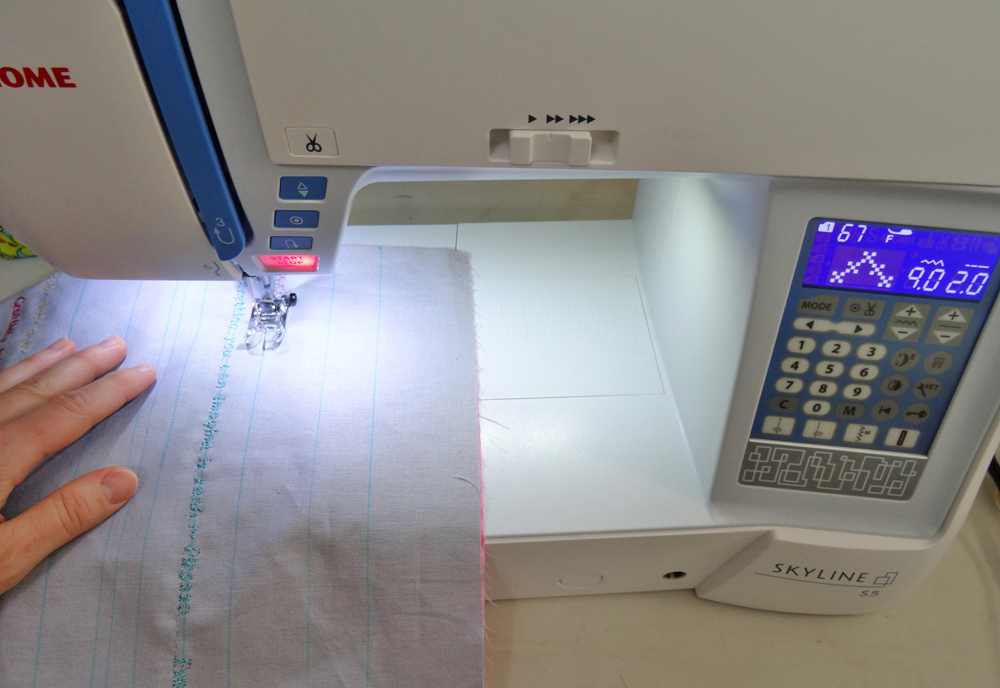
Specifically on the S7 machine, you can choose a lapped or a concealed zipper from the LCD screen. My zip wasn’t exactly either one, so I chose the Lapped Zipper, Right Side stitch to move the needle to the correct position. LOVE not moving the needle over by eye! Of course you can set it up manually as well, the preset buttons just take the guess work out of the process. Changing the foot was simple. My Janome machines all have “Easy Change” feet – just click the foot in and out of the machine. I used to need a screwdriver and generic zipper foot with my previous SUV1122 because it’s default “easy change” zipper foot is one-sided and wider than I liked, not as convenient for sure!
Oh, and don’t forget, zipper feet are also not just for zippers. Sewing close to thicker edges and using it to install piping and pompom trim are just a few other things you can use it for.
Zipper Tutorial Round-Up
I’ve tried to narrow down this round-up to general use zipper installations. But, I couldn’t resist adding in the one on how to match your fabric, it really is easier than it looks!
Basic Zipper Installation ~ Lapped Zipper Installation ~ Invisible Zipper with Video ~ Exactly Match Fabric Across a Zipper Opening
I hope you’ve learned a lot today! I’m having fun because this series lets more of my passion for making sewing easy and accessible out into the world! Please let me know if you have any questions and I’ll do my best to help you out.
Next Week we’ll be talking about Sewing Heavier Fabrics. I get to make an oldie (but goodie!) Follow along on social media to find out what it will be!
by Sherri Sylvester | Mar 11, 2016
Welcome to the second installment of this week’s Sewing Diaries! Yesterday we talked about: 1) Unboxing the Machine, 2) Preparing to take care of it and 3) Learning what it can do.
Now we are ready to sew! Today we talk about getting the machine ready, two projects I chose to sew first, (and why!) plus a bonus tip and tutorial for them. (BTW, isn’t the Sewing Diaries logo amazing? It was made by fellow Janome Artisan and amazing graphic artist Cynthia Frenette for this project – #loveit! )
Meet Your New Machine – Step 4: Get Ready to Sew!
It is important to learn how to get a bobbin wound, thread the machine, and insert the bobbin correctly.
Again, this information is in your manual, or on your included instructional DVD. (Yay S7!) All of my Janome machines have had a similar thread path, but each has been a little different. I like to make sure I’m doing it correctly the first time because it’s harder to change once you’ve memorized it incorrectly! A tip when threading the machine: It is important to use a spool holder to hold your thread on the spool pin. Make sure it is the correct size, the S7 comes with large and small size thread caps. (For reference, I’ve used the small cap in the photo below.)
When filling the bobbin, note the correct winding direction for the thread in your manual. When filling it, most machines will stop once the bobbin is full, then you can cut the threads. The S7 includes 5 small cutters under the bobbin area for right before you wind it, and one for cutting the main thread once you are done. #noscissorsnecessary
When threading your machine, follow the path and be sure to pull the threads as indicated in your manual to ensure the tension discs are engaged. Don’t skip threading through that tiny hook right above your needle! Use a needle threader to thread the needle, or the automatic threader if your machine has one. I made an Instagram video of the advanced needle threader on the S7. It is truly amazing!
The bobbin should be inserted as per the manual again. Noting that it is especially important to insert it so it spins the way your machine wants it to. My Janome machines have needed the bobbin to spin counter-clockwise.
Meet Your New Machine – Step 5: Sew a Simple Project (or two!)
Alright, we are ready to sew now. I think the best way to start out is to make a simple first project without any closures, leave the buttonholes and zipper feet for The Sewing Diaries – Week 2. I decided to make two of my all-time most popular tutorials, The fat-quarter friendly Sunny Glasses Case and the Pretty Floral Divided Tote.
Both of these are really quick and satisfying projects. Good for confident beginners and advanced sewers alike. They allow you to use your new machine to make something useful and fun, while not having to reach for your manual with each step. (P.S. I changed a few things from both original tutorials, so I’m sharing a tip and a mini tutorial for them at the end of this post.)
I broke out my hoarded Mochi Dot linen for these, and some Paris fabric my mom gave me years ago. It’s so gorgeous I’ve been saving it for the perfect project (and I’ve got some left still, yay!) You can never go wrong with linen, canvas and polka dots!
Meet Your New Machine – Step 6: Plan to test your machine
One great way to test your machine is to tackle your mending pile. There is usually a varied selection of fabrics, lots of knits and wovens of different weights to work with. It even provides different situations such as mending a pant leg by using the free arm or fixing a ripped tee with an overcasting stitch.
The second way to test your machine is to plan several specific projects that use different features of your sewing machine. This is the way I am going to write the Sewing Diaries, since I’m sure you are not interested in seeing my mending pile. (I’m pretty sure I don’t want you to see it either!)
How to Choose Your First Projects
- Incorporate fabric types that you tend to already sew. Save the uncommon ones for another time, unless you bought your machine specifically to use it for an uncommon fabric you want to learn to sew.
- Incorporate feet that you will use all the time. Buttonhole, Zipper foot, Blind or Rolled Hem foot – sew a woven dress. 1/4″ Foot, free motion quilting feet – make a quilt. AcuFeed Flex, Overedge foot, zigzag foot – choose a simple knit top.
- Find projects that are simple or ones you’ve sewn before. Learning a new machine might be frustrating because you are not familiar with where everything is or how it works yet. Choosing a complex project will just add to your frustration and it would be so sad if you quit!
This process resulted in me writing the The Sewing Diaries Overview you found at the beginning of yesterday’s post. But, no matter what projects you choose, make sure your manual is on hand to help as you go along – you may need to know how to use a certain stitch, install the knee lift, or change the default height of presser foot for pivoting (Yup, the Skyline S7 can do that!).
I found out how to use one of my favorite features when I was checking the manual for something else, a tiny black button on the back of the S7 zigzag foot. If you push it in while lowering the presser foot it will lock the foot in a horizontal position. Meaning, if the front of the foot is elevated on some thick fabric, the back of the foot will stay elevated until you are past the beginning of the seam ! It helps your seam to begin smoothly when sewing thick or layered fabrics like the french seam on my Sunny Glasses Case.
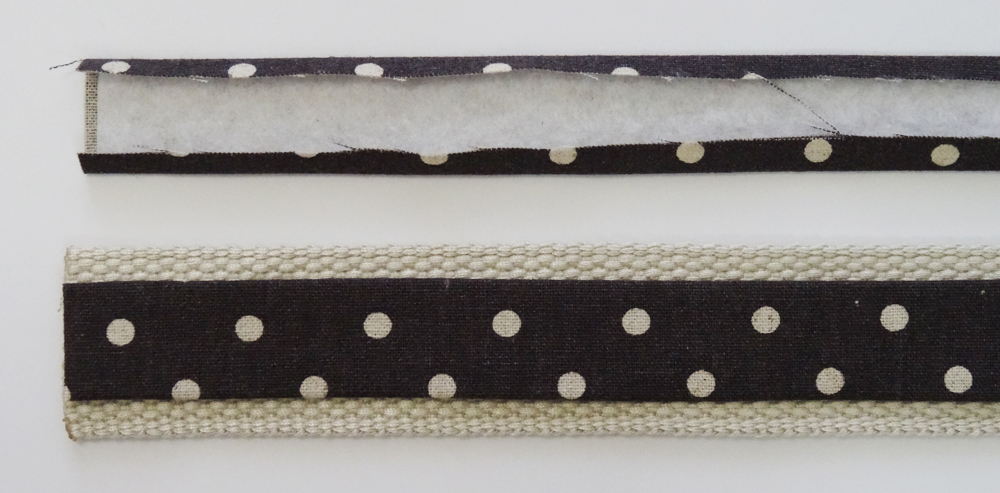
The Pretty Floral Divided Tote is made with just 1 yard each of outer and lining fabric. I had just a bit less than that, so I slightly shortened the pattern piece and also omitted using the lining fabric on the Straps. Instead I used 1 1/2″ webbing and sewed strips of outer fabric over the front to add detail. Here is a mini tutorial on how to make some yourself.
- Cut 2 OUTER Straps: 1 1/2″ x 21″, Cut 2 from Fusible Fleece: 7/8″ wide by 21″, Cut 2 pieces of 1 1/2″ webbing 21″ long.
- Fuse the Fleece to the wrong side of the Outer Straps, directly in the centre of each piece.
- Fold the Outer Strap fabric over the fusible fleece on both sides. Use the edge of the fleece as a guide.
- Glue Baste the Outer fabric to the centre of each length of webbing.
- Top-stitch the Outer Fabric on both sides about 1/8″ away from the edge to finish the strap.
Each time I make a Sunny Glasses Case I find a new and improved way of sewing it. I have been collecting tips for at least a year now and plan to post them sometime soon! For now, however, one thing that makes a big difference to the final product is a very simple step. Instead of only using Fusible Fleece on the Outer fabric, cut a second layer and fuse it to the wrong side of the Lining as well. The extra padding makes the case sturdier. It holds it’s shape better and looks more professional.
Thanks for checking out the first installment of the Sewing Diaries. I can’t wait to tackle learning about closures this coming week! They open up a whole new area of your sewing. Remember you can come #alongforthreadride anytime to see sneak peeks and project photos!
by Sherri Sylvester | Mar 10, 2016
Sewing on a new machine, or even infrequently on an old one might make you wonder how best to learn about it. Even a seasoned sewer doesn’t likely know everything their sewing machine has to offer – and how do you go about planning to learn?
I felt this way a few weeks ago when Janome gave me the opportunity to use their new machine – the Skyline S7. It has so many features it’s hard to know where to start! Short answer is: #allthehearts for this machine…. Long answer is this and the next five weeks of this new series.
Welcome to the first ever The Sewing Diaries – Meet Your New Machine! Janome asked me if I’d like to write about how you can easily learn to use your new sewing machine. I know some of you are thinking, “Why can’t I just start sewing?” And of course you can… but I think it would be helpful to go about it a little more slowly. Try to stop the urge to pick up a project right away – I know you can do it. By step 4 of this week’s process you’ll be a pro at knowing your machine, and the sewing will come easily after that!
This week I am sharing what I think are the best 6 Steps to Unboxing your Machine. This post accidentally became ridiculously long so full of awesome information *winky face* because I am long winded thorough, so I’ve decided to split it into two parts! The overview and first 3 steps today and the last 3 steps and tutorial tomorrow.
During this 6 week series I will talk a lot about the Janome Skyline S7 because, *spoiler alert* these posts are made specifically for it! But, don’t be discouraged, my ultimate goal is to provide you with information about how to learn about your sewing machine, Janome or not! Each installment of The Sewing Diaries will list step-by-step ways you can get to know YOUR amazing machine. I am being extra careful to make each post applicable whether you own a budget basic, or the latest and fanciest model available.
Disclaimer: Janome has loaned me a Skyline S7 for the purposes of writing these Sewing Diary posts. Please know, as with all products I write about, that I always tell you my own honest opinion. I bought and loved Janome products long before they contacted me and they have not asked me to qualify my opinions in any way.
The Sewing Diaries – Meet Your New Machine! Overview
This diary and sewn topic-related projects are happening in real time! One topic per week. This gives you a chance to follow along with your new machine. You can see sneak peeks of the projects as they are sewn on Facebook, Instagram, Twitter and Pinterest.
Here is what we will talk about: Week 2: Closures ~ Week 3: Heavy/Uncommon Fabrics~ Week 4: Knits (without a serger!) ~ Week 5: Embellishing your Projects (ie. Stitches and Machine Feet) ~ Week 6: Quilting/Piecing
This Sewing Diaries series ends right before the Creativ Festival in Toronto where I am excited to be presenting a Trunk Show once each day. I will be showing off these Skyline projects, some of my older favorites and giving tips and tricks to make your sewing easier and more fun! Plus, the Grand Prize at the Festival is your chance to win a Janome Skyline S7!
Let’s get started!
Meet your New Machine – Step 1: Un-boxing
After you wrangle your new machine out of it’s packaging and up onto your table, *oof* where do you start? To stay organized, first put away all of the extras that came with your sewing machine. That way you have seen them all and can keep track of them while learning the machine.
Putting these pieces away also helps to make sure you have everything you should! For example, when I unpacked the S7 I thought the cord for it’s extra-large foot pedal was missing. A quick consult with the manual shows it wound up neatly in the bottom of the pedal, in it’s own covered compartment – high five for that one Janome! One of my pet peeves is tangled, messy cords.
If you can, store everything in the body of your machine. This way all the pieces stay together when you take your machine out. If you don’t have a storage area in your machine – find an appropriately sized container (or sew one – just not yet!). Thankfully, the Skyline S7 has a lot of storage space. A flip-down compartment at the front and a shallow tray underneath the extension table. The top of this machine even has a small space I use to hold needle cases for the current needle type I’m using.
Meet Your New Machine – Step 2: Mentally prepare to take care of your investment
This might not be the most fun to think about right away, but I think this step is really important. Taking good care of your machine will help it to last longer. Cleaning your machine and taking it in for maintenance on a regular basis helps you to get great tension and straight stitches every time you sew. It also helps when you all of a sudden *need* to sew that great new project you just found – without any machine issues!
Find your manual and head to the section called Care and Maintenance and look it over. I was really happy to find that the Skyline S7 does not need to be oiled, Hooray! The back of the S7 manual tells how to clean the bobbin (or hook area) and thread guide, and recommends they are cleaned once a month. I figure, if the vacuum cleaner is out once a week to rid my office floor of threads, it can’t hurt to take off the needle plate and get rid of any excess build up there as well!
As a general rule, I found out that these machines work best when regularly cleaned and that machine needles should be replaced after about 8 hours of sewing. These are good guidelines for any machine type. I’ve learned over the last year that changing your needle (and using the right type) can drastically improve your stitches.
Meet Your New Machine – Step 3: What can your sewing machine do?
You probably know this, since you bought the machine – otherwise you wouldn’t have it, right? Even so, there are probably a few things to learn. Take a few minutes to overview the basics by scanning the brochure, manual or even the outside of the box!
Here’s a shortened run-down for the S7:
- Automatic presser foot lift, 240 stitches, multiple alphabets, 15 included feet, 9mm stitch width, 5mm stitch length. Full colour backlit LCD touchscreen. AcuFeed Flex feeding system (it’s a souped-up walking/even foot and it’s amazing!). Stitch Composer with software for designing custom stitches. Computerized tension, automatic foot pressure, advanced needle threader, free arm, drop feed, thread cutter, adjustable knee lift. It also has an included second needle plate, only for straight stitching a start/stop button and more. *whew!*
Some features won’t be apparent until you scan information about the different feet or read how to use them. A random fact I found out through stalking a few blogs is that the S7 can apparently learn the length you stitch when strip piecing and repeat it, stopping and cutting the threads between blocks. Other things are more subtle, like the backward stitch. It sews backwards continuously and is great for things like mending a ripped pant leg when you can’t easily pivot to stitch the other direction and need both hands to sew straight.
See you Tomorrow with Part 2!
Now that you’ve collected all this information, only one more step and you will be sewing! Tomorrow I’ll share the rest of this week’s information, a mini-tutorial, and more about the projects I made this past week.
by Sherri Sylvester | Mar 1, 2016
I have a good stash of ribbon… well, maybe more than a good stash. More like an entire cute Ikea garbage can full! They collect much faster than I can sew them into all the things. This skirt , however, saved me a bit of stash-guilt by using up about 44″ each of 10 different ribbons – all in one skirt, hooray! Plus, I got to play with lots of fun stitches on my On-Loan Janome Skyline S5!
I decided to use some gray Essex linen, left over from my Camber Dress a few years ago. After checking with my “anti-gray” oldest child to make sure she’d wear it, I got to pull out my bucket ‘o ribbons and decide which ones to use. I wanted to add in some decorative stitches and since my oldest loves to draw, I found a few quotes to add in.
Love, love being able to personalize this skirt for her! One quote says “Creativity takes courage. ~ Matisse” and the other is “Everything you can imagine is real. ~ Degas” The Skyline S5 has a 50 stitch memory. After programming it, all I had to do was start stitching and it continued the pattern until I stopped it at the other edge of the skirt.
After using this machine for about 6 months, one of my favorite features is the automatic tension. It is so nice not to have to think about it when sewing through multiple layers and different thicknesses. I used a pink bobbin throughout this project, to match the lining, and it doesn’t show even once on the outer fabric.
As a word of caution, I am new to the world of embroidery and stitching and did not have any stabilizer on hand. *collective gasp* Yes, I know, I did just do that. #liveandlearn You can do better than me and make sure to have some behind all of your decorative stitching. Thankfully the waviness pressed out with a bit of steam – whew. I did put a layer of woven fabric behind my linen, because I was worried the loose weave and the stitching wouldn’t play well together. This helped a bit, but stabilizer is now #1 on my shopping list.
Materials
- 44″ wide outer fabric – see sizing/cutting instructions below
- lining/stabilizer – see sizing/cutting instructions below
- various ribbons/embellishments
- 3/4″ elastic, non-rolling
- thread to match ribbons for top-stitching
- removable fabric pen/ruler
- decorative stitches and thread (optional)
Note: Make sure your ribbons are machine washable, and the colours won’t run. Pre-wash them if you can. Be sure to test if they are colour-fast with hot water as you would another fabric. If you are worried, wash skirt in cold water and hang to dry. It is also recommended that you check to see if the ribbons can be pressed Some synthetic blends will melt when heat is applied. It is best to press the skirt from the wrong side with not much heat unless you are sure the ribbons can take it.
Prep Work:
- Measure the desired length of your skirt (I used a ready-to-wear size 7 skirt as an example and measured 15″)
- Add 3″ to your length to leave room for hemming and an elastic casing.
Sizing: If your child’s waist/hips are between 21″-27″ a 44″ width of fabric should be fine. If not, fabric should be cut to the final length x double your child’s waist measurement.
Cut Your Fabric:
- Cut your outer fabric from selvage to selvage at your desired length (including the 3″ from Prep Work Step 2).
- If using a lining fabric, cut this to the same size as the outer fabric. If not, prepare strips of stabilizer to be adhered behind decorative stitching.
Here We Sew:
- If using a lining fabric, place lining and outer fabric wrong sides together. Baste if desired, from now on treat this as one fabric.
- Use a removable fabric marker to mark the casing on the outer fabric at 1 1/4″ down from the top long edge. Mark the hem with a line 1″ up from the bottom.
- Lay ribbons along the width of the skirt in your desired layout. Place stiffer ribbons near the middle/bottom – since they won’t gather as well. It is good to leave about 1″ of room under the casing and before the hem. Be sure to leave room for some decorative stitching, too! If you don’t have fancier stitches on your machine a zig-zag stitch or some closely sewn straight stitched lines would be cute too.
- Mark the ribbon placement on a short outer fabric edge. It is helpful to take a temporary photo or write down the order so you can remember it later!
- Mark lines for the top edge of each ribbon across the width of the skirt, so they all end up straight! It helps to fold the skirt so the two short outer edges are lined up and transfer the ribbon placement marks- this way the ribbons will hopefully match up along the back edge of your skirt.
- Add your decorative stitching and ribbons as desired. Switch thread colours as necessary to top-stitch your ribbons neatly.
- Trim the ribbons to match the fabric edges and finish the sides so the fabric does not fray. I used the “M” overcast foot that came with this machine, and a double zig-zag overcasting stitch. This fabric is NEVER going to fray now! You could also finish the edge with a serger or a zig-zag stitch and some Fray Check.
- Pin the short edges of the outer fabric right sides together, matching ribbon placement as you go. Stitch with a 3/8″ seam. Press the seam open to reduce bulk.
- Fold and press the hem under 1/2″ then under 1/2″ again. Top-stitch a generous 3/8″ away from the folded edge.
- Fold and press the casing under 1/4″, then 1″ to leave room for the elastic. Stitch near the first folded edge, leaving a 3″ opening.
- Insert the elastic into the casing and feed it through with a safety pin. The elastic will be roughly the length of your child’s waist measurement + 1″. Though, it is best to try the skirt on and fit it accordingly.
- Overlap the elastic and stitch it together. Push it back into the casing and stitch the casing closed. Remove any marked lines. You are finished!
Enjoy your fancy skirt! My oldest was so cute and made sure to thank me “for the most beautiful skirt ever.” She’s a keeper! 😉
Thanks for reading to the bottom of the post. Join me for “thread ride” so you don’t miss more great content!
Disclaimer: Janome Canada has kindly allowed me to borrow this loaner machine on a 1 year contract and I am so grateful to them! I want to say again, as with all the products I write about – I always tell you my own honest opinion. I have bought and worked with Janome products for 90% of my sewing life and used their products long before they contacted me. I am so happy to give them a great review because I already love and support this product.
by Sherri Sylvester | Feb 24, 2016
Whew – fun things going on over here. Today’s post is full of random fun facts about what’s going on at Thread Riding Hood. Including the 3 winners of the latest giveaways!
In the midst of lots of recent quilt piecing fun I’ve posted on Facebook and Instagram, I updated my Free Measurement Chart Printable for you today! I just realized I haven’t measured my girls recently and we’re going to need to because it is Easter dress planning time again. I added some better numbering and a few more measurements to the original chart. Head over to the Measure-Me Chart post or click below to get the new printable. I’m hoping to update the photos as well, but my printer has informed me I can’t print anything because I am out of ink. Argh!
I love making the girls super fancy dresses at least once a year – especially in time for Easter Sunday. Right now I’m leaning toward the Violette dress. While the girls still like being princesses! Of course I still have to run it by them and see what they think. I’d hate to gather that much tulle if they won’t wear it more than once! I’ve got some gold dupioni silk scraps that might stretch to make the bodice and peplum for one dress. Overkill maybe, but the scraps are too small for a “me-sized” project, so I may as well use them up! Here are some past Easter dresses – I love all of these patterns! You can click on them to link to more photos. (Crazy how big these girls are getting!)
What is your favorite little/medium sized girls’ dress pattern?
BIG NEWS! If you haven’t been over to Instagram lately, check out the machine Janome has loaned me to play with right now! I’ll be sharing a fun series with them leading up to Toronto’s Spring Creativ Festival. I’m really excited to let you know that Janome is sponsoring me as I present a trunk show once each day at the Festival this spring. Eeek!
WINNERS! I know, I held off until the end, thanks for being patient…. Here are the winners of the recent giveaways!
First off, Country Clothesline gave away two 12 fat quarter bundles during their Valentine’s sale. How gorgeous are these?!
#625 – Renee H. won by following Thread Riding Hood on Bloglovin’
#269 – Lorrie R. won by following Country Clothesline on Pinterest.
Last but definitely not least, Fabric Please! made someone very happy by giving away a Lil’ Red layer cake! I love the quilt top I was able to make with mine. The colours are super happy! (Quick tip: their 1st Year Anniversary sale is still on until Friday, February 26, 2016!)
#4 Linda B. won by visiting us on Facebook!
Congratulations to all of the winners. Thanks so much for supporting my sponsors, please take a visit over to both of these wonderful shops.
by Sherri Sylvester | Feb 3, 2016
Today I’m posting a free school-approved non-food/candy Valentine printable! (Spoiler alert for all of our neighbors!)
These supplies are easy to find, so this project comes together super-fast! The erasers were 60 pcs for $1 from Target, the clear bags were 72 for $1 from my local Dollar Store. Sewing (or stapling) them on was simple, since I needed to make more than 70 of them. And I decided to use up my almost-empty thread spools and the fancy stitches on my Janome Skyline S5. My kids happened to like the heart stitch best, so we used it a lot.
The cards are designed in 7 colour-ways. A rainbow of colours, because I have girls – and rainbows always make things amazing. #rainbowtizeeverything Plus I wasn’t sure what to do about the boys in their classes. I suppose they will live with the frilly border and girl-centered eraser choices in blue or teal green!
Make sure, when sewing paper with your sewing machine, to use an old needle and replace it right after sewing these. (You might also want to clean the inside of your machine too!)
Supplies: Small clear bags, Sewing Machine or Stapler, Thread, Small Erasers, 4×6 Photo Paper or Cardstock
Instructions: Print as many cards as you need, cut them if necessary. Place the erasers in clear bags and attach them to the cards. Write names on them and DONE!
More Valentine Tutorials, Printables & Inspiration